
September 14, 2026
Everything we previewed at the end of the last release, delivered in one update. ZPortals v6.4 brings a brand-new Premium Theme, a native Zoho Desk Knowledge Base, per-page control over whose data each portal page shows, and a Backup & Restore system that turns moving or rolling back a portal into a two-click job. Along the way it also picks up progress bars for any module, smarter Desk ticket lists, Print and Download PDF for Books documents, and a long list of admin and stability improvements.
Version 6.4.1 is the build to install. It includes everything from 6.4.0, so you can jump straight to it from any 6.3 install.
The Premium Theme
Give your clients a portal that looks like it was built this year.
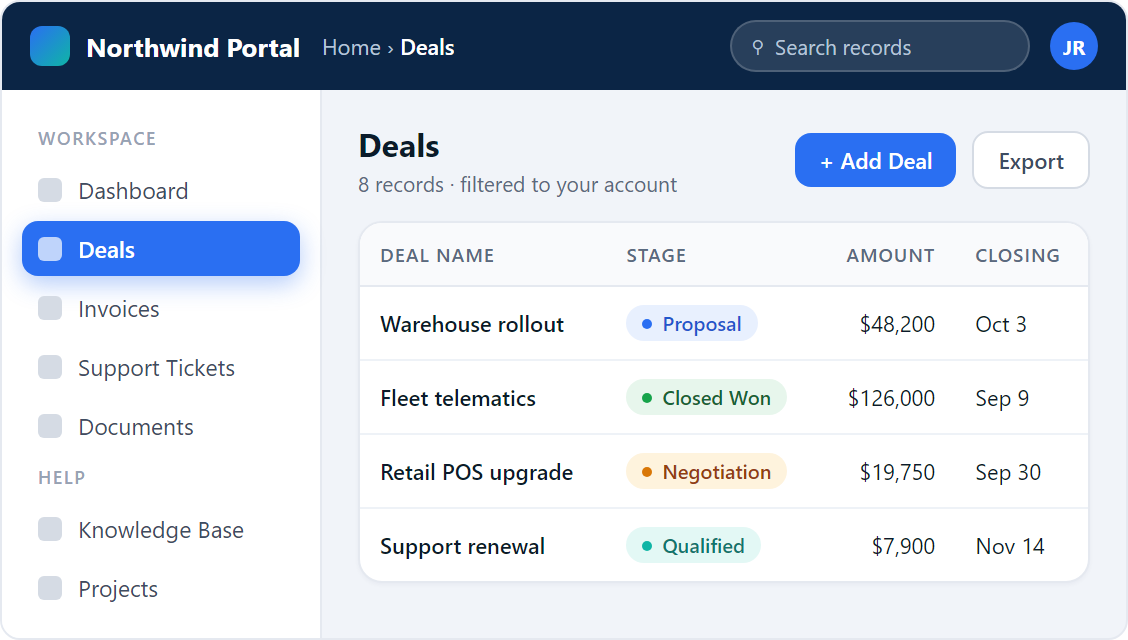
The Premium Theme is a ground-up redesign of the portal chrome. The horizontal top navigation is gone, replaced by a clean vertical sidebar with a glowing active state, section labels, and a user card at the bottom. A navy top bar carries your logo, breadcrumbs, search, and profile menu. Content sits on a soft canvas with white cards, Inter typography, and one consistent set of status pills across Desk, Sign, Store, and Projects.
It is not only the shell. Record lists, detail pages, add and edit modals, subform editors, attachments, notes, and stage bars have all been redesigned to match. Modals load with a skeleton instead of a full-screen spinner, success messages arrive as quiet toasts, and inline-edit pencils reveal on hover. On phones the sidebar becomes a slide-in drawer, field grids collapse to a single column, and tables scroll inside their cards. Keyboard focus states and reduced-motion support are built in.
Your existing layouts, colours, and menu structure carry over. Switch themes, and every page you have already configured renders in the new design.
Zoho Desk Knowledge Base, Inside Your Portal
Stop sending clients off to a separate help centre. Your help articles now live behind your portal login, in your portal’s theme.
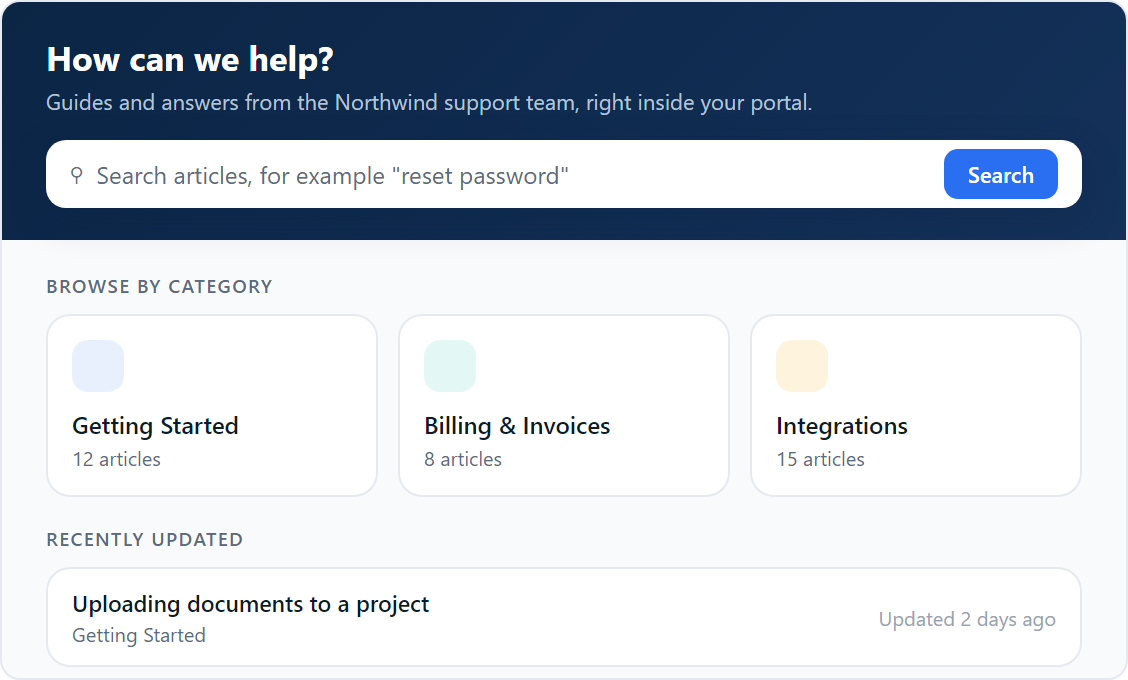
Portal users get a Knowledge Base page with search, top-level categories, sub-categories, and full articles rendered natively, images included. No iframe, no second website, no separate login. Because it runs inside ZPortals, it inherits the portal theme, works with the Premium Theme’s sidebar and breadcrumbs, and supports deep links so you can point a client straight at the article they need.
The integration reuses your existing Zoho Desk connection, so there is nothing new to authorise. You choose which help centre and department to surface and which categories to exclude, and per-profile permissions decide who sees the page at all. Articles marked for agents only never reach the portal.
Hybrid Portal Mode
One portal no longer has to be all-account or all-contact. Decide per page whose records it shows.
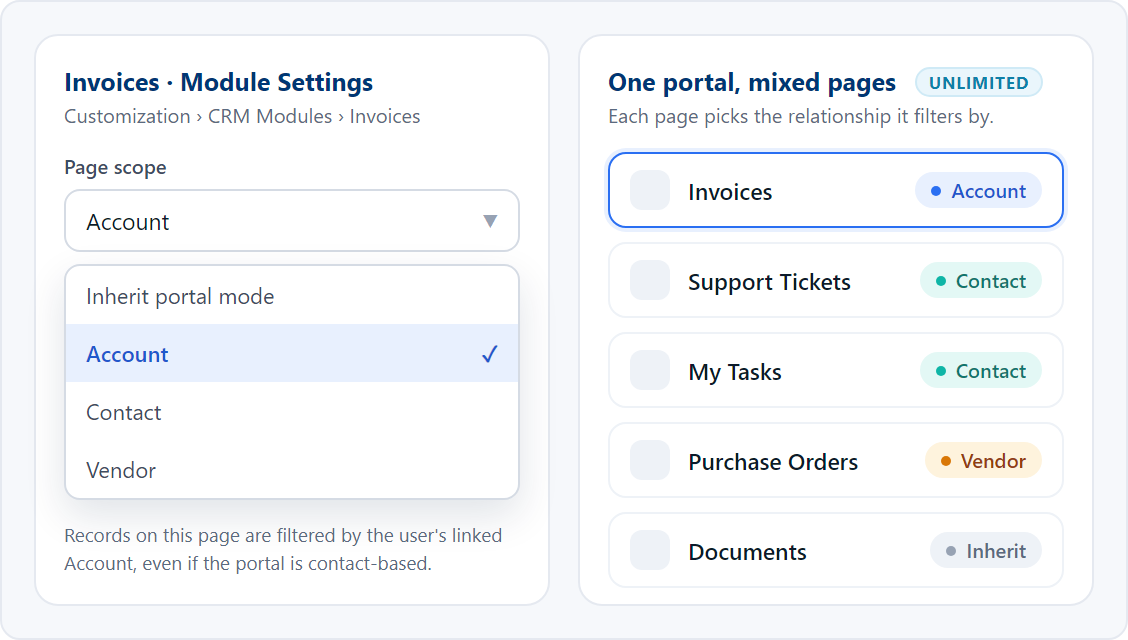
Until now a portal was either account-based, where every page showed records for the user’s company, or contact-based, where every page showed records tied to the individual. Plenty of real portals want both. An Invoices page should show everything for the company. A Support Tickets page should stay personal to the person logged in. A Purchase Orders page on a supplier portal should follow the Vendor.
Hybrid Portal Mode adds a Page scope setting to every CRM module page: inherit the portal-wide mode, or override it to Account, Contact, or Vendor. The list view, filters, and CSV export all follow the page’s scope. If a page cannot work out the user’s relationship, it shows nothing rather than everything, so a mis-configured page can never leak records.
Backup & Restore
Rebuild a portal in minutes instead of an afternoon.
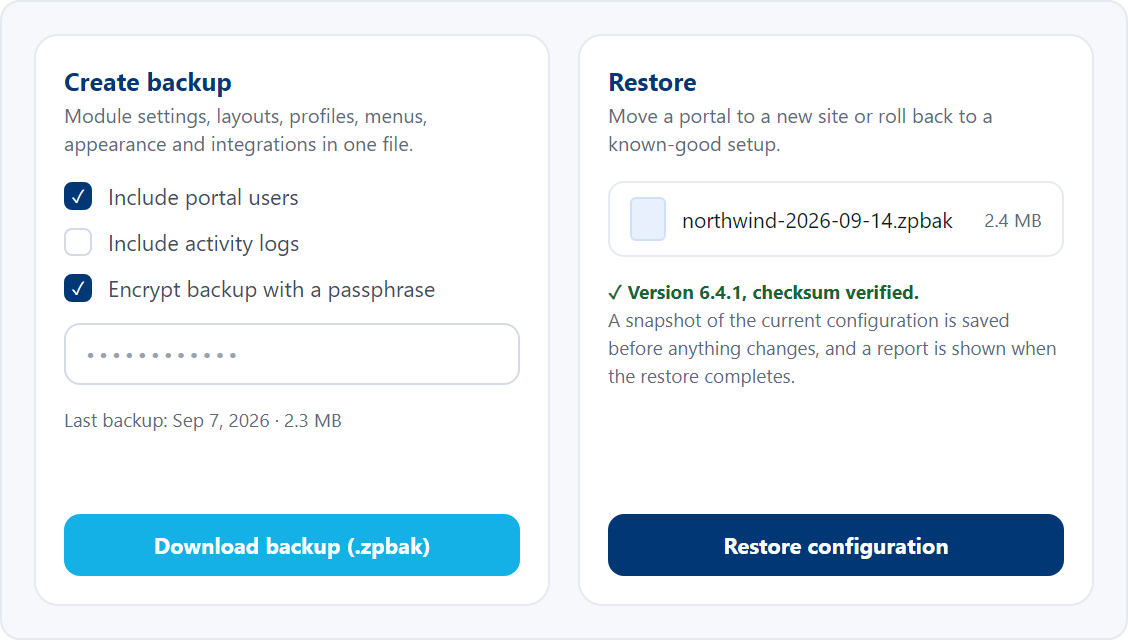
A ZPortals configuration is a lot of careful work: module settings, layouts, field permissions, profiles, menus, appearance, dashboard content, and integration settings. Backup & Restore exports all of it as a single file you can keep, move to a staging site, or restore onto a fresh WordPress install. Backups can be encrypted with a passphrase and can optionally include your portal users, so you can promote a staging configuration to production without touching the live user list.
Restores are cautious by design. ZPortals checks the file’s version and checksum, refuses a backup from a different Zoho organisation, takes a snapshot of the current configuration before anything changes, and finishes with a report of what was restored. Backups from this version stay restorable on future versions, so the file you make today is still useful next year.
Progress Bars for Any Module
Deals have always had a stage bar. Now any picklist field on any module can have one.
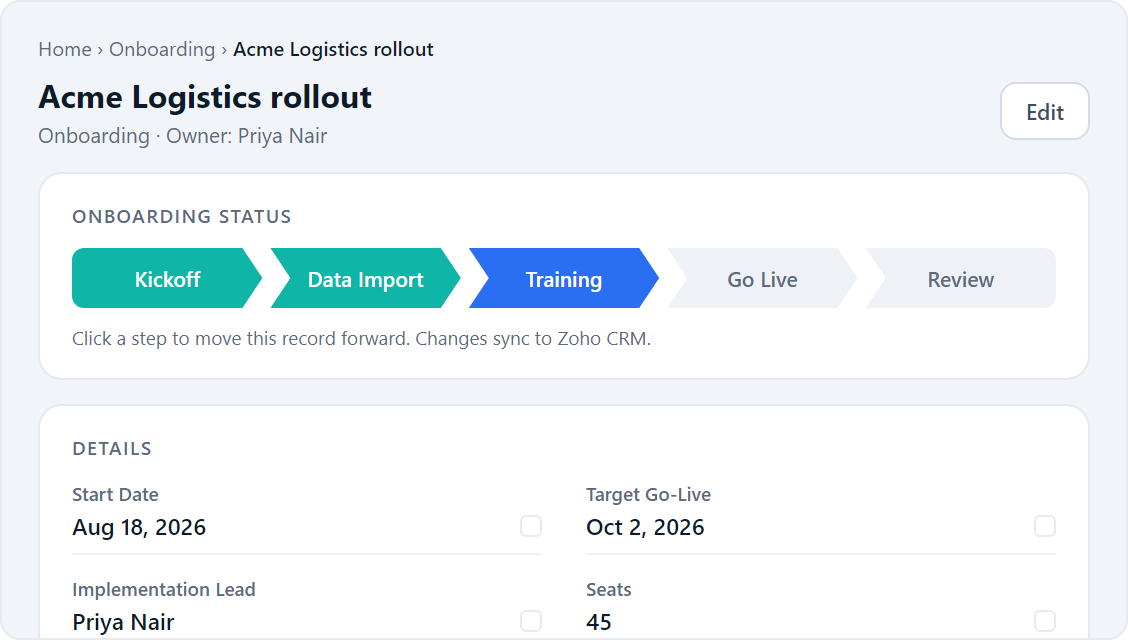
Pick a picklist field in a module’s settings and the record page renders it as a step-by-step progress bar, with the field’s own values as the steps. An onboarding status, an order stage, an application state, a project phase: whatever your picklist tracks becomes visible at a glance. Users whose role allows it can advance the stage from the portal, and a confirmation dialog on the Premium Theme keeps accidental clicks from moving a record forward.
Smarter Desk Ticket Lists
Clients find the ticket they need without scrolling past closed ones.
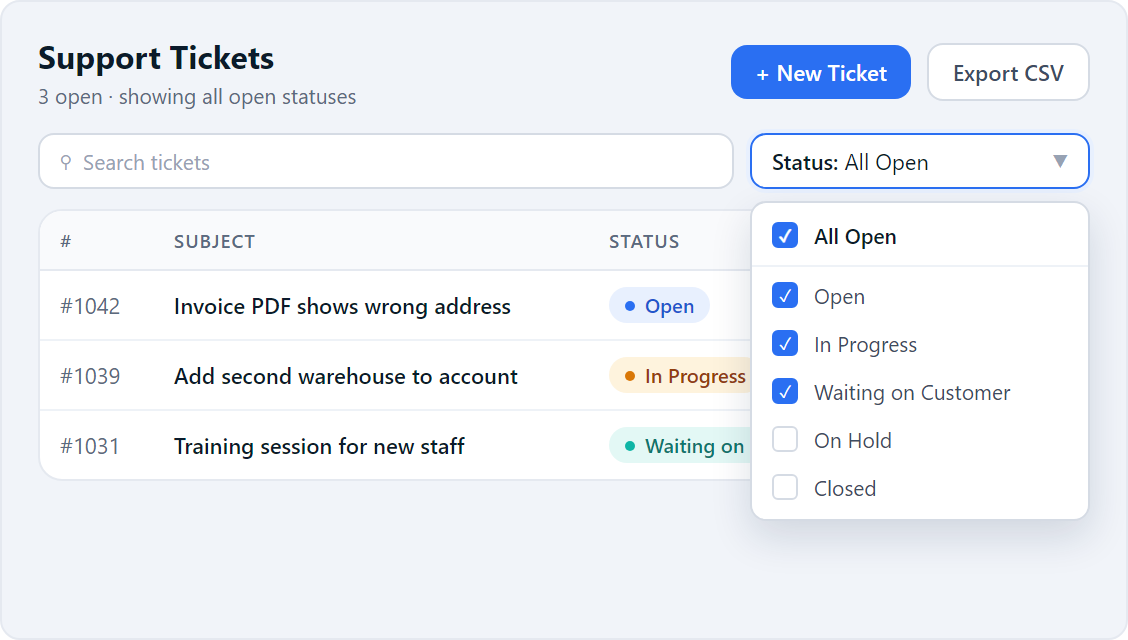
The ticket list gains a multi-select status filter with an All Open option that covers every status still in play. Admins can exclude statuses from the portal entirely, so internal states never show up in a client’s list, dropdown, or ticket details. An admin-enabled CSV export lets clients pull their ticket history when they need it. On multi-department setups each Desk page now keeps its own layout, and the ticket detail view honours the layout you configured.
Books Documents, Sign-up, and Admin Upgrades
A round of smaller changes that each remove a support ticket or two.
Print and download Books documents
Invoices, estimates, sales orders, purchase orders, and retainer invoices now have Print and Download PDF buttons right on the detail page, streaming the same PDF Zoho Books generates. No more “can you email me a copy” requests.
Terms & Conditions consent at sign-up
Add your Terms URL in sign-up settings and every new registration must tick a consent box linking to it before an account is created. The check is enforced on the server, not only in the browser. Alongside it, every user table in the admin now shows a Registered date, the original sign-up time survives approval, and you can export all portal and pending users to CSV.
An independent Profile page
The portal Profile page no longer shares its settings with the Accounts module page. Each has its own layout, permissions, and menu entry, so editing one never changes the other. Existing settings migrate automatically on upgrade.
WorkDrive uploads where you want them
The file upload block on WorkDrive pages is now a movable section in the layout builder with an optional title, so you decide where it appears instead of it always sitting at the top.
Billing, merge tags, and the admin panel
The admin User Details screen shows the linked Zoho Billing customer with a re-sync action that rebuilds the link and flags likely duplicates, and the My Plans page reports API problems instead of showing an empty table. Merge tags can now pull from lookup and owner fields. Every layout page has a Save button at the top as well as the bottom, the theme picker shows real thumbnails, and User Surveys gain an Announcement type that shows a rich-text notice with a single acknowledgment button.
Performance, Polish & Stability
Beyond the new features, this release closes a long-standing reliability problem and tightens security across the board.
If your Zoho connections have ever dropped all at once after a security plugin or your host rotated WordPress keys, that is fixed for good. Stored tokens are now encrypted with a dedicated key that does not change when WordPress salts do, and existing connections are re-keyed automatically on upgrade. Tokens are encrypted at rest, every call to Zoho verifies the connection it is talking to, and the admin panel, OAuth flows, and user-management actions all carry tamper protection.
Non-portal pages on your site no longer load the WordPress editor bundle, which trims several hundred kilobytes from your home and marketing pages. Portal assets now cache properly between visits and fonts load without blocking the page. Projects hours and budget display correctly, task tables honour the columns you configure, and empty project lists stay quiet in the error log.
This release also includes dozens of bug fixes and stability improvements across login and sign-up, child-account switching, dashboard visibility, subform file uploads, related-module layouts, and the admin panel.
Ready to Upgrade?
Update to v6.4.1 through your WordPress admin panel. Your settings, layouts, and Zoho connections carry over automatically.